


Coloring games: speed drawing
3.953.00 Reviews
App Specs
- Version
- 16
- Updated On
- License
- Free
- Downloads
- 1,000,000+
- Developer
- Akarau Multiplayer online & offline io & car games
- Categories
- Art & Design
- Platform
- Android, iOS
Screenshots

 Analysis by AppCompare
For me, a coloring app earns its place on a phone when it makes a short break feel genuinely relaxing rather than turning every tap into a decision. Coloring games: speed drawing is aimed at that quick, low-pressure kind of creativity: pick a design, add color, and see how it looks without needing to learn a full drawing program. Its focus is approachable, but the “speed drawing” idea also raises a practical question: does it feel comfortable when you want to make something quickly, and does it hold up when you spend longer on a page? That’s the lens I’d use before choosing it.
What “fast” should mean in a coloring app
I wouldn’t treat speed as a promise that every artwork will be finished instantly. In this kind of app, the useful version of speed is a simple path from opening a picture to making visible progress: choosing colors without fuss, applying them with control, and being able to stop when a spare moment ends. That matters more in everyday use than racing through a page. A design with many small spaces naturally takes longer than a broad, uncomplicated one, so I’d start with a simpler picture if I had only a few minutes.
The app is a free art-and-design app from Akarau Multiplayer online & offline io & car games. It has an average rating of 3.9 from around two thousand ratings, and has passed one million installs. Those figures suggest a sizable audience, but they don’t tell me whether its particular pace will suit you; the best test is whether the coloring workflow feels pleasant on your own device. It is rated for Everyone, runs on Android 5.1 and newer, and its current version is 16.
Quick sessions and longer coloring stretches
A realistic use for this app is a short pause between tasks: open a design while waiting for a drink, fill a few sections, then put the phone away. A second useful routine is to return to a picture during several breaks rather than expecting to finish it in one sitting. That makes the activity easier to fit around work, commuting, or a quiet evening, and it takes pressure off producing a polished result every time.
Longer sessions are a different test. Repeated tapping and choosing colors can become tiring even when the app itself feels responsive, especially if a design is crowded with tiny areas. I’d alternate between detailed pages and simpler ones instead of treating every session as a challenge to complete the most intricate image. If you notice your attention drifting, save your effort for another break; coloring is most useful here as a relaxing activity, not a task that needs to be finished on schedule.
How I’d judge reliability and device fit
Touch response and stability matter more than fancy effects in a coloring app. A delay between a tap and a visible change can make careful work frustrating, while an unexpected interruption can break the calm the activity is supposed to provide. I would pay attention to how it behaves on your device during ordinary use, particularly when switching away and returning to a picture. I can’t responsibly promise identical performance on every phone or tablet, so a brief trial with a simple design is a sensible first step.
Device limits also shape the experience. A smaller screen can make narrow spaces harder to select, while a larger display may feel more comfortable for detailed coloring; either way, the most elaborate page isn’t automatically the best choice. If your phone is older or tends to slow down with visually busy apps, keep your first session modest and see whether the controls remain comfortable. The Android minimum of 5.1 gives the app a broad baseline, but it isn’t a guarantee that every compatible device will feel equally smooth.
Worth Reading Before You Choose

EA SPORTS FC Mobile 26 Is a Bigger Football Game, but It Takes Time

Flipboard Shows What News Apps Must Do Beyond the Feed

Switching to Android Auto Means Rethinking Your Driving Routine

Google Calendar Makes a Crowded Week Easier to Manage

Ludo King Makes the Most of the Minutes Between Plans

Baby Panda World Brings Quick Play to Modern Phones, but Its Game Library Feels Busy
Getting Started with the App
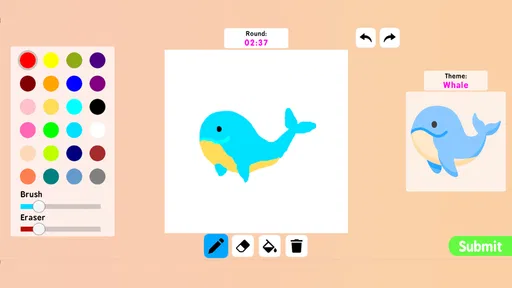
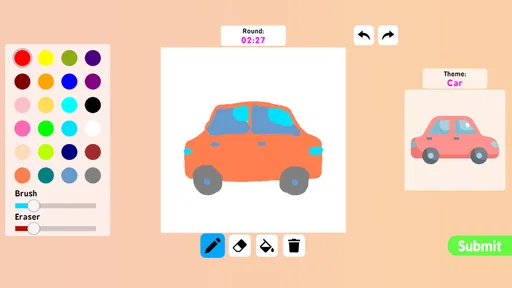
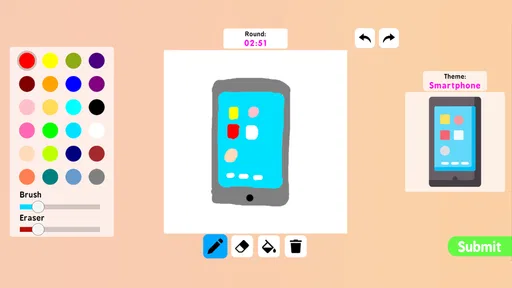
Right off the bat, downloading and setting up Coloring games: speed drawing was a breeze. It's available on both Android and iOS, so no worries about compatibility. Once installed, the interface is inviting and straightforward. You’re greeted with a vibrant palette and a slew of options to dive right into.
The app offers a variety of templates, ranging from intricate mandalas to playful animal designs. You can also start with a blank canvas if you're feeling adventurous. There’s something incredibly satisfying about picking a design and seeing it come to life under your fingertips.
Features that Stand Out
What sets this app apart is its speed drawing feature. It allows you to color swiftly without compromising on detail. The app uses smart technology to keep your strokes within the lines, which is a blessing for people like me who struggle with precision.
Another cool feature is the option to customize your palette. You can mix and match colors to create unique shades, making it feel like you have an infinite number of crayons at your disposal. Plus, there are effects like gradients and textures that add depth to your artwork.
User Experience
Using the app feels like pure magic. The touch response is smooth, and there's no lag, making the coloring experience seamless. One thing I appreciated was the absence of intrusive ads. They’re there, but they don’t interrupt your creative flow.
Sharing your creations is super easy too. With just a tap, you can send your masterpiece to friends or post it on social media. The app also includes a gallery where you can view art from other users, providing inspiration and a sense of community.
Choosing it over other art apps
I see this as a lighter choice than a traditional drawing app. A full illustration tool is better when you want layers, precise brush control, or a workflow built around making original artwork from scratch. A basic digital coloring book, by contrast, is usually best when you want to fill areas and leave the design itself alone. This app sits between those habits: templates offer a ready-made starting point, while the blank-canvas option and palette customization invite a little more experimentation.
That middle ground is useful if you want color play without the learning curve of a professional art tool. It may be less satisfying if your main goal is technical drawing, careful line work, or a highly controlled project you plan to revise repeatedly. I’d choose it for casual coloring and quick creative breaks, but I’d reach for a dedicated illustration app when the process matters as much as the finished image.
Small choices that make a session easier
One practical tip is to decide on a limited palette before working through a picture. A few related colors can make a page feel intentional and save you from repeatedly reconsidering every section. If you want a more playful result, try a contrasting accent rather than changing every color as you go. The point isn’t to follow a rule; it’s to keep the app’s quick, casual rhythm from turning into a long sequence of tiny choices.
I’d also use the templates differently depending on my mood. A simple animal design is a good warm-up when I want an easy win, while a mandala suits a quieter stretch when repetition feels calming. The blank canvas makes more sense when I already have an idea, because starting without a guide can take more thought than coloring a prepared outline. Those choices help answer a common question: it can work for both beginners and more confident hobbyists, but the templates are the easier entry point.
Who will enjoy it—and who may not
I’d recommend trying it if you like coloring but don’t want to carry pens or a paper book, or if you want a low-stakes creative activity during short gaps in the day. It can also suit someone who feels unsure about drawing freehand, since a template gives the session structure. The ability to adjust colors makes it more personal than simply filling a page with fixed choices, while the effects offer room to play without requiring a formal art lesson.
I’d be more cautious if you’re looking for a serious drawing workspace, dislike tapping through small sections, or want a guaranteed interruption-free experience. The listed audience rating is Everyone, but that doesn’t mean the format is right for every age or every preference; a young child may need help with a small touchscreen, while an experienced artist may find template coloring limiting. If you mainly want to sketch with a stylus, build complex compositions, or manage detailed revisions, a dedicated drawing tool is likely a better fit.
Free access, expectations, and everyday use
The app is free, which makes it easy to try without committing money just to see whether the style suits you. I’d start by exploring the basic coloring experience and only consider any optional purchases if you find yourself returning often and want more to work with. Since it’s a casual creative app, the better question isn’t how much content you can rush through; it’s whether opening it reliably gives you a pleasant few minutes. The developer’s name is Akarau Multiplayer online & offline io & car games, and the app’s current version is 16.
For a simple daily routine, I’d keep a picture as a small ongoing project: add a handful of colors during a break, then revisit it later when there’s time. That approach also helps if the phone rings or you need to switch tasks, because you don’t have to treat every session as a complete artwork. If you’re concerned about performance, begin with one of the less detailed templates and notice whether selecting areas and changing colors remains comfortable. That is more useful than assuming a device will behave perfectly just because it meets the minimum operating-system requirement.
Why You Should Download It
If you're someone who loves to unwind with a bit of creativity, Coloring games: speed drawing is definitely worth checking out. It's not just about coloring; it’s about expressing yourself and finding a moment of peace in a busy day. The app encourages you to unleash your inner artist, whether it's through detailed coloring sheets or freestyle designs.
Moreover, the app is free to download, with in-app purchases available for additional content. This means you can enjoy the core features without spending a dime, making it accessible to everyone.
Final Thoughts
In a world that's constantly demanding our attention, Coloring games: speed drawing offers a delightful escape. It's more than just an app; it's a tiny portal to a world of color and creativity. So, if you're looking for a way to relax and tap into your artistic side, give this app a go. Who knows, you might just discover a hidden talent for speed drawing!
Ready to start your coloring adventure? You can download Coloring games: speed drawing on Android and iOS today. Happy coloring!
Pros
- User-friendly interface for all ages.
- Wide variety of coloring tools available.
- Frequent updates with new designs.
- Offline mode supports play anywhere.
- Encourages creativity and relaxation.
Cons
- Contains ads that may interrupt flow.
- Some premium content requires payment.
- Limited export options for artworks.
- May consume significant battery life.
- Occasional glitches in saving progress.
FAQs for Coloring games: speed drawing
What is Coloring Games: Speed Drawing?
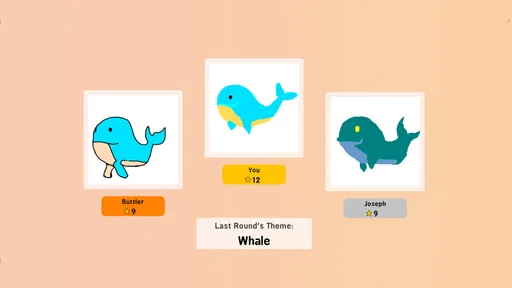
Coloring Games: Speed Drawing is an engaging mobile app designed for both Android and iOS platforms, offering users the opportunity to enhance their artistic skills through various coloring activities. The app combines the elements of creativity and speed, challenging users to complete drawings within set time limits, which adds an exciting twist to the traditional coloring experience.
Is Coloring Games: Speed Drawing suitable for all ages?
Yes, Coloring Games: Speed Drawing is designed to be family-friendly and suitable for users of all ages. The app features a range of difficulty levels, making it accessible for children, teens, and adults alike. Parents can feel confident allowing their children to explore the app's creativity-driven activities.
Are there in-app purchases in Coloring Games: Speed Drawing?
Coloring Games: Speed Drawing offers a variety of free features; however, it also includes optional in-app purchases. These purchases can enhance the user experience by unlocking additional coloring tools, themes, and advanced features, providing more creative options for users who wish to expand their artistic capabilities.
Can I use Coloring Games: Speed Drawing offline?
Yes, Coloring Games: Speed Drawing supports offline functionality, allowing users to enjoy coloring activities without an internet connection. This feature makes it convenient for users to engage with the app while traveling or in areas with limited connectivity, ensuring a seamless artistic experience at any time.
What devices are compatible with Coloring Games: Speed Drawing?
Coloring Games: Speed Drawing is compatible with a wide range of devices on both Android and iOS platforms. Users should ensure their devices are running the latest operating systems to guarantee optimal performance. The app is regularly updated to support new device models, ensuring a smooth and enjoyable user experience.


